


 Jul 17,2026
Finding prospects, preparing personalised messages and managing follow-ups are essential parts of outbound sales. They are also some of the most repetitive and time-consuming activities completed by sales teams.
A sales development representative may spend hours researching companies, identifying decision-makers, verifying contact details, preparing messages and monitoring responses. When the number of prospects increases, maintaining the same level of quality becomes difficult.
Sales automation can reduce this workload. However, effective automation requires more than adding contacts to a generic email sequence.
Businesses need a connected system that can identify suitable prospects, collect relevant information, personalise communication, respond to prospect behaviour and involve human representatives when necessary.
This guide explains how to automate prospecting, outreach and follow-ups while maintaining relevance, control and a positive experience for potential customers.
What Is Sales Prospecting Automation?
Sales prospecting automation is the use of technology to identify, research, enrich, score and organise potential customers.
It reduces the amount of manual work required before a sales representative contacts a prospect.
A prospecting automation system may help a business:
- Identify companies that match its ideal customer profile
- Find relevant decision-makers
- Collect approved company and contact information
- Research potential business needs
- Enrich incomplete prospect records
- Score and prioritise leads
- Assign prospects to the appropriate campaign
- Record information in the CRM
Traditional prospecting tools often automate individual activities, such as finding email addresses or building contact lists. AI-powered systems can go further by analysing several pieces of information and using them to determine whether an account is relevant.
What Is Outreach Automation?
Outreach automation uses technology to prepare, send and manage sales communication across channels such as email, LinkedIn and voice.
It can help sales teams:
- Create messages from approved templates
- Personalise communication using prospect information
- Schedule messages
- Coordinate outreach across different channels
- Monitor responses
- Pause sequences when a prospect replies
- Route interested prospects to the appropriate person
- Record activities in the CRM
The purpose of outreach automation should not be to send the highest possible number of messages. It should help the business contact suitable prospects consistently and with a clear reason for reaching out.
What Is Follow-Up Automation?
Follow-up automation manages the communication that happens after the first contact.
It can determine when a prospect should receive another message and what that message should address.
A follow-up system may respond differently depending on whether the prospect:
- Has not responded
- Opened or interacted with a message
- Requested more information
- Raised an objection
- Asked to be contacted later
- Booked a meeting
- Missed a scheduled meeting
- Asked not to receive further communication
This makes follow-up automation more useful than sending the same sequence to every prospect regardless of their response.
Why Businesses Automate Outbound Sales Activities
Prospecting, outreach and follow-ups are connected. If one stage is poorly managed, the entire outbound process can become less effective.
Manual prospecting limits capacity
Representatives can only research a limited number of companies each day. As the target market grows, the team may struggle to maintain accurate and detailed research.
Generic outreach reduces relevance
When representatives must contact many prospects, they may rely heavily on broad templates. These messages often fail to explain why the company is contacting that particular person.
Follow-ups are easily missed
Representatives may prioritise new leads and active conversations while forgetting prospects who require another follow-up.
Interested prospects may receive slow responses
A prospect who responds may have to wait for a representative to review the message, update the CRM and arrange the next step. Delays can reduce momentum.
CRM records become incomplete
When representatives manage several channels manually, important activities may not be recorded accurately. Automation can address these challenges, but only when it supports a well-defined outbound strategy.
How to Automate Sales Prospecting
Sales prospecting automation helps businesses identify, research and prioritise suitable prospects before outreach begins. It reduces manual research while ensuring that the outreach team receives accurate and relevant prospect information.
To automate sales prospecting:
- Define your ideal customer profile
- Establish clear prospecting criteria
- Connect approved data sources
- Automate account and contact research
- Enrich and verify prospect data
- Score and prioritise prospects
1. Define Your Ideal Customer Profile
Automation should begin with a clear ideal customer profile. Without one, an automated system may produce a large list of companies with little reason to purchase your solution.
Your ideal customer profile may include:
- Industry
- Company size
- Revenue range
- Location
- Business model
- Growth stage
- Technology used
- Common operational challenges
- Relevant buying signals
- Current sales structure
You should also identify the people involved in the buying decision.
For example, a founder may prioritise growth and cost efficiency. A VP of Sales may focus on pipeline generation and team productivity. A RevOps leader may care about data quality, workflow coordination and performance visibility.
These differences should influence how prospects are selected and contacted.
2. Establish Clear Prospecting Criteria
Convert your ideal customer profile into specific criteria that an automated system can evaluate.
For example:
- Include companies within selected industries
- Focus on organisations within a defined employee range
- Prioritise companies operating in target markets
- Identify founders, sales leaders and RevOps decision-makers
- Look for relevant growth or buying signals
- Exclude competitors and existing customers
- Exclude prospects who have previously opted out
The criteria should be precise enough to reduce unsuitable leads without becoming so restrictive that valuable opportunities are missed.
3. Connect Approved Data Sources
The prospecting system needs reliable information to identify and research potential customers.
Depending on your company’s process, approved sources may include:
- Existing CRM records
- Company websites
- Business databases
- Professional networks
- Approved contact-data providers
- Public company information
- Intent or engagement data
Businesses should only use information they are permitted to access and process. Data collection must follow applicable privacy requirements, platform rules and internal security standards.
4. Automate Account and Contact Research
AI can collect and organise relevant information about target companies and decision-makers.
Account and contact research may include:
- What the company does
- The market it serves
- Its approximate size
- Relevant products or services
- Publicly available business developments
- Potential operational challenges
- The prospect’s position and responsibilities
- Previous interactions with the company
The system can summarise this information and add it to the relevant account record. This gives the outreach system context for personalisation and helps sales representatives understand each prospect.
5. Enrich and Verify Prospect Data
Incomplete or inaccurate information can weaken an outbound campaign.
Data enrichment can add missing details such as:
- Job title
- Company name
- Industry
- Company size
- Business email address
- Phone number
- Location
- LinkedIn profile
- Company website
Verification should happen before outreach begins. The system should check whether the contact still works at the company, matches the intended buyer role and has valid business contact information.
Prospects with uncertain or conflicting information should be sent for human review instead of being added automatically to an outreach campaign.
6. Score and Prioritise Prospects
Not every prospect should receive the same level of attention.
AI can score prospects based on factors such as:
- Ideal customer profile fit
- Decision-making authority
- Company characteristics
- Relevant business signals
- Previous engagement
- Data completeness
- Likelihood of needing the solution
High-priority prospects may receive additional research or human-reviewed personalisation. Medium-priority prospects may enter an educational sequence, while unsuitable prospects should be removed from the active campaign.
Sales leaders should understand why each score was assigned. Transparent scoring makes it easier to adjust the criteria and improve prospect quality over time.
How to Automate Personalised Outreach
Automating personalised outreach allows sales teams to contact more suitable prospects without relying on one generic message. The process combines verified prospect information, audience segmentation, approved messaging and behaviour-based workflows to create communication that remains relevant at scale.
To automate personalised outreach effectively:
1. Segment Prospects Before Creating Messages
Personalised outreach begins with segmentation. Instead of sending the same message to every prospect, organise prospects into groups based on shared characteristics, needs or priorities.
Useful segmentation criteria include:
- Job role
- Industry
- Company size
- Location
- Business model
- Growth stage
- Technology used
- Business challenge
- Previous engagement
- Relevant buying signals
Each segment should have a defined problem, value proposition and call to action.
For example:
- Founders and CEOs: Focus on increasing outbound capacity without growing headcount at the same rate.
- VPs of Sales: Focus on pipeline generation, sales productivity and consistent execution.
- RevOps leaders: Focus on workflow coordination, CRM accuracy, governance and performance visibility.
- SDR managers: Focus on prospecting capacity, follow-up consistency and representative productivity.
Segmentation gives the outreach system enough context to create messages that reflect the priorities of different buyers.
2. Develop an Approved Messaging Framework
AI should not create every message without direction. Provide an approved messaging framework that defines what the system can communicate and how it should represent the company.
The framework should include:
- Target audience
- Prospect’s likely problem
- Product value proposition
- Key benefits
- Approved product information
- Supporting evidence
- Brand voice and tone
- Preferred call to action
- Claims that must not be used
- Situations requiring human approval
The framework may also include different messages for each stage of the prospect’s journey.
For example:
- Problem awareness: Help the prospect recognise an inefficient or expensive process.
- Solution awareness: Explain how AI-powered outbound sales can address the problem.
- Product consideration: Introduce how Autonoms AI supports the required workflow.
- Decision stage: Encourage the prospect to schedule a conversation or explore the platform.
A clear messaging framework helps AI personalise communication while remaining consistent with the company’s positioning.
3. Personalise Messages Using Relevant Information
Effective personalisation goes beyond adding the prospect’s name and company to a template.
The message should connect the prospect’s context with a relevant business problem or outcome.
AI can personalise outreach using:
- The prospect’s role and responsibilities
- The company’s industry
- Company size or growth stage
- A relevant public business development
- Technology currently used
- Previous interactions
- A likely operational challenge
- The prospect’s stage in the buying journey
For example, a message to a VP of Sales may focus on inconsistent outbound execution:
Scaling outbound sales often means increasing prospecting, follow-ups and CRM administration for your team. Autonoms AI coordinates these activities through specialist AI employees, helping sales teams expand execution while maintaining human oversight.
A message to a RevOps leader may focus on coordination and visibility:
When prospecting, outreach and CRM updates operate across separate tools, maintaining accurate pipeline data becomes difficult. Autonoms AI connects these workflows through one coordinated AI workforce.
Only relevant and verified information should be included. Avoid mentioning unrelated personal details or forcing a reference simply to make the message appear personalised.
4. Coordinate Communication Across Outreach Channels
Prospects may interact with a company through email, LinkedIn, phone calls or other approved channels. These activities should form one coordinated conversation.
A multichannel outreach workflow might include:
- Send a personalised introductory email.
- Schedule an appropriate LinkedIn interaction.
- Send a follow-up email that introduces another value point.
- Assign a call for high-priority prospects.
- Pause all automated outreach when the prospect responds.
- Update the CRM with every interaction.
The system should know which messages have already been sent on each channel. This prevents prospects from receiving repeated or conflicting communication.
Channel coordination should also include:
- Frequency limits
- Appropriate sending times
- Prospect time zones
- Channel-specific message formats
- Response monitoring
- Opt-out management
- Compliance with platform rules
The goal is not to contact prospects everywhere at once. It is to select the most appropriate channels and create a consistent experience.
5. Establish Sending and Approval Rules
Not every message should be sent automatically. Businesses should determine which actions AI can complete independently and which require human approval.
For example:
- Standard messages to verified prospects may be sent automatically.
- Outreach to strategic accounts may require human review.
- New campaign messages may require approval before activation.
- Messages containing uncertain information should be blocked.
- Pricing or contractual statements may require approval.
- Sensitive responses should be transferred to a human representative.
- Messages outside the approved knowledge base should not be sent.
The approval process can also depend on the stage of implementation.
During the early stages of a campaign, a human reviewer may approve every message. Once the targeting and messaging have been validated, routine communication can become more automated while high-risk actions remain controlled.
Review Outreach Quality and Performance
Automated personalised outreach should be monitored regularly to ensure it remains relevant and effective.
Important metrics include:
- Delivery rate
- Response rate
- Qualified response rate
- Meeting-booking rate
- Opt-out rate
- Lead-to-opportunity conversion
- Number of messages requiring correction
- Performance by audience segment
- Performance by outreach channel
Sales leaders should also review message quality. A campaign may generate activity while still presenting the company poorly or attracting unsuitable prospects.
A strong personalised outreach system combines accurate data, audience understanding, approved messaging, coordinated channels and human oversight. It enables the business to increase outbound execution without sacrificing relevance or control.
How to Automate Sales Follow-Ups
Automating sales follow-ups helps ensure that prospects receive timely and relevant communication without requiring sales representatives to track every interaction manually.
An effective follow-up system should respond to what each prospect does instead of sending the same sequence to everyone. It should also know when to stop outreach, schedule meetings or transfer a conversation to a human representative.
To automate sales follow-ups effectively:
- Build follow-ups around prospect behaviour
- Create a structured follow-up sequence
- Establish clear stop conditions
- Automate meeting scheduling and reminders
- Transfer complex responses to human representatives
1. Build Follow-Ups Around Prospect Behaviour
A fixed sequence sends messages according to a predetermined schedule. A behaviour-based workflow adjusts the next action according to the prospect’s response or activity.
For example:
- No response: Send a concise follow-up that introduces a different value point.
- Positive response: Begin qualification or provide available meeting times.
- Request for information: Send an approved resource that addresses the request.
- Objection: Route the response to the appropriate workflow or sales representative.
- Contact-later request: Pause communication until the prospect’s preferred date.
- Meeting booked: Stop promotional outreach and begin meeting reminders.
- Opt-out request: End the sequence immediately and update the contact record.
This approach creates a more relevant experience because the next message reflects the prospect’s position in the sales process.
2. Create a Structured Follow-Up Sequence
Every follow-up should have a clear purpose. Repeating the original message with slightly different wording is unlikely to provide enough value for the prospect to respond.
A structured sequence may include:
- Initial outreach: Introduce the relevant business problem and explain why you are contacting the prospect.
- First follow-up: Present a different benefit or practical outcome related to the problem.
- Second follow-up: Address a common concern or explain how the solution works.
- Third follow-up: Share a relevant resource, use case or helpful insight.
- Final follow-up: Ask whether the prospect would like to continue the conversation or have the outreach closed.
The timing and number of messages should reflect the audience, communication channel and length of the sales cycle. The objective is to remain helpful and consistent without overwhelming the prospect.
3. Establish Clear Stop Conditions
Every automated follow-up sequence needs rules that determine when communication should stop.
The sequence should end or pause when:
- The prospect replies
- A meeting is booked
- The prospect asks to be contacted later
- The contact opts out
- The email address is invalid
- The account is disqualified
- The maximum number of follow-ups is reached
- A sales representative takes ownership
- The prospect becomes an existing customer
Stop conditions prevent prospects from receiving unnecessary messages after taking action. They also ensure that automated communication does not continue while a human representative is already managing the conversation.
When a stop condition is triggered, the system should update the CRM and record why the sequence ended.
4. Automate Meeting Scheduling and Reminders
When a qualified prospect is ready to speak with the sales team, the system should make scheduling the meeting simple.
It can:
- Check the assigned representative’s availability
- Recognise the prospect’s time zone
- Present suitable meeting times
- Schedule the meeting
- Create and send the calendar invitation
- Send confirmation and reminders
- Update the CRM
- Notify the assigned sales representative
- Provide the representative with the prospect’s information and conversation history
Once a meeting is booked, the prospect should be removed from the active sales sequence and transferred to a meeting reminder workflow.
If the prospect misses the meeting, the system can send a polite message with an option to reschedule instead of returning the person to a general outreach sequence.
5. Transfer Complex Responses to Human Representatives
AI can manage routine follow-ups, but some conversations require human knowledge, judgment or authority.
A response should be transferred to a human representative when it includes:
- A complex product question
- A pricing or contract discussion
- A request for a customised solution
- A technical or security concern
- An unusual objection
- A partnership enquiry
- A complaint
- A request from a strategic account
- A question outside the approved knowledge base
The sales representative should receive:
- The prospect’s contact and company information
- The complete conversation history
- Relevant qualification details
- The reason for the escalation
- The recommended next action
- Any promised response time
This prevents the prospect from having to repeat information and helps the representative continue the conversation with the necessary context.
A well-designed follow-up system combines consistent automated execution with clear human handoffs. Automation manages routine communication, scheduling and record-keeping, while human representatives take responsibility for conversations requiring deeper judgment or relationship-building.
Connecting Prospecting, Outreach and Follow-Ups
Automating these stages separately can create gaps.
The prospecting tool may identify a lead, but the outreach system may not receive the research. The email platform may record a response, but the CRM may remain unchanged. A scheduling tool may book a meeting, but the follow-up sequence may continue sending messages.
A connected workflow allows information to move through the process.
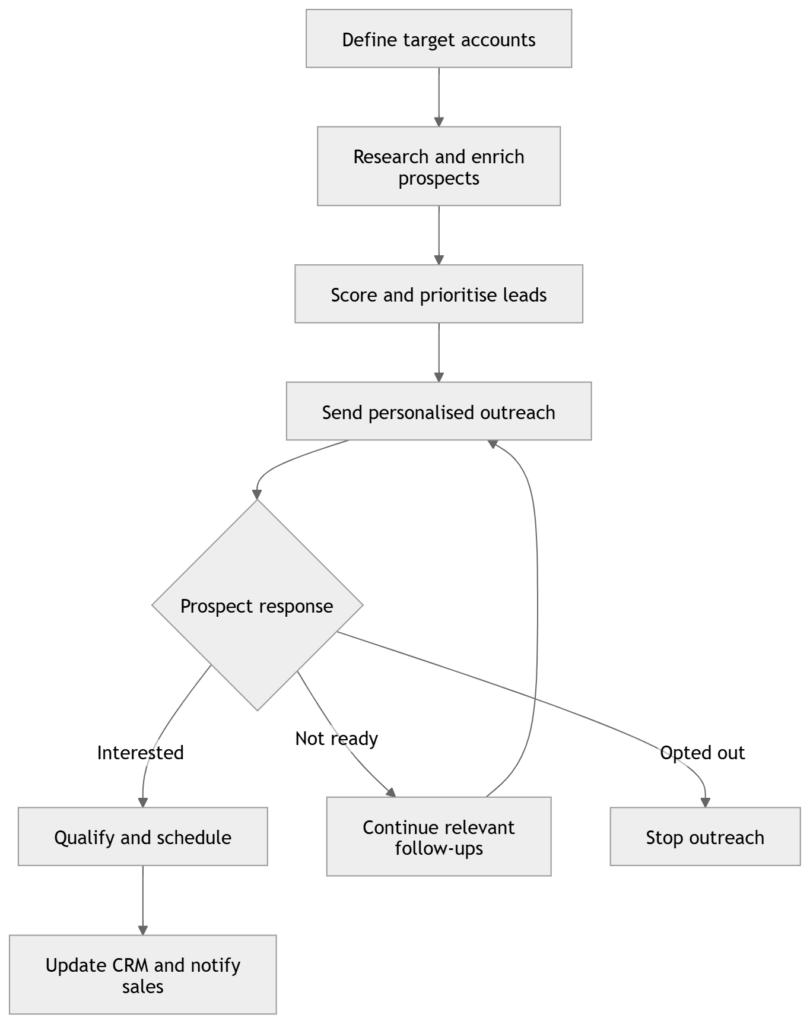
This coordination is the difference between automating individual tasks and building a scalable outbound sales system.
Common Sales Automation Mistakes
Although automation can improve outbound sales execution, applying it without a clear strategy can create more work and produce a poor prospect experience. Common mistakes to avoid include:
- Automating before defining the target audience: Automation cannot correct an unclear ideal customer profile. It may simply help the company contact unsuitable prospects faster.
- Buying tools without designing the workflow: Several tools may automate individual tasks while creating more work for the sales team. Define how information should move through the process before selecting technology.
- Using generic AI-generated personalisation: Mentioning a company name or recent post does not automatically make a message relevant. Personalisation should connect the prospect’s context to a genuine business problem.
- Sending too many follow-ups: More follow-ups do not always produce better results. Every message should provide additional value and respect the recipient’s preferences.
- Failing to pause sequences after responses: A prospect should not continue receiving automated sales messages after replying, opting out or booking a meeting.
- Relying on unverified data: Incorrect names, job titles or company details can damage trust. Verify essential prospect information before using it in outreach.
- Removing human oversight: AI can support execution, but people should remain responsible for strategy, quality control, exceptions and important decisions.
- Measuring activity instead of outcomes: The number of prospects added or messages sent does not show whether the campaign is generating qualified responses, meetings and sales opportunities.
Avoiding these mistakes helps businesses build an outbound sales system that increases execution capacity while maintaining relevance, accuracy and human control.
Metrics to Track
Businesses should measure the performance of the entire workflow, not only the number of messages sent. Relevant metrics include:
- Prospect quality: The percentage of generated prospects that match the ideal customer profile.
- Data accuracy: The completeness and accuracy of prospect and company information.
- Delivery rate: The percentage of emails successfully delivered to valid recipient addresses.
- Qualified response rate: The percentage of responses that indicate a relevant need or legitimate sales opportunity.
- Meeting-booking rate: The percentage of contacted or responding prospects who schedule a meeting.
- Meeting attendance rate: The percentage of scheduled meetings that take place.
- Lead-to-opportunity conversion rate: The percentage of qualified leads that become active sales opportunities.
- Follow-up completion rate: The percentage of required follow-ups completed at the appropriate time.
- Time saved: The amount of representative time recovered through automated research, scheduling and data entry.
- CRM accuracy: The completeness and accuracy of prospect activities, lead statuses and next steps recorded in the CRM.
These metrics provide a clearer view of whether automation is improving prospect quality, sales execution and pipeline development.
Where Human Oversight Is Required
A reliable automated outbound system should clearly separate autonomous activities from actions requiring approval.
Humans should remain involved in:
- Defining the ideal customer profile
- Approving campaign strategy
- Reviewing new messaging
- Setting communication limits
- Handling complex responses
- Managing strategic accounts
- Reviewing compliance
- Monitoring campaign performance
- Correcting inaccurate AI output
- Making major sales decisions
This approach combines the consistency of automation with human accountability.
How Autonoms AI Automates Outbound Sales Workflows
Autonoms AI provides a coordinated AI workforce for outbound sales.
Specialist AI employees can work across:
- Account and prospect research
- Contact and company enrichment
- Lead scoring and prioritisation
- Email outreach
- LinkedIn outreach
- Cold calling
- Follow-up management
- Lead qualification
- Meeting scheduling
- CRM updates and hygiene
An orchestrator coordinates how tasks and information move between these AI employees. Human-in-the-loop controls allow organisations to define which actions can happen automatically and which require approval.
This helps businesses move beyond disconnected sales tools and build a coordinated system for outbound execution.
Build a Connected Outbound Sales Process
Prospecting, outreach and follow-ups should not operate as separate activities.
When they are connected, prospect research informs personalisation, prospect behaviour determines follow-ups and every interaction updates the sales pipeline.
AI makes it possible to coordinate this work across more prospects without requiring representatives to manage every repetitive task manually.
Autonoms AI helps businesses deploy specialist AI employees for prospect research, outreach, qualification, scheduling and CRM management, all coordinated through an AI Workforce Operating System with human oversight.
Ready to automate more of your outbound sales process while maintaining control?
Visit https://autonoms.ai/ to discover how a coordinated AI workforce can support your outbound execution.